

Dynaroute.ai – Features
Smarter Routes. Lower Operating Costs. More Profitable Operations.
Dynaroute.ai is an AI-powered mobile solo route optimization, multi-stop route planning, navigation, and operational profitability application designed for professionals who manage their own daily routes.
Unlike traditional navigation applications that mainly calculate how to travel from one location to another, Dynaroute.ai is designed to solve the more complex problem of visiting multiple customers, delivery points, pickup locations, service calls, or business stops in the most efficient order.
Dynaroute.ai combines multi-stop route optimization, live traffic-aware routing, AI address geocoding, Excel and OCR import, delivery and pickup management, vehicle capacity planning, 3D load planning, Dynamic ETA, last-minute order insertion, route re-optimization, Proof of Delivery, operational KPIs, Profit-Aware Routing, and an integrated ROI Calculator in a single mobile application.
AI-Powered Multi-Stop Route Optimization

At the heart of Dynaroute.ai is its AI-powered route optimization engine.
When multiple stops need to be visited, the order in which those stops are completed can have a major impact on total driving distance, route duration, fuel consumption, working time, and operating costs.
Dynaroute.ai analyzes the stop network and creates an optimized visiting sequence designed to reduce unnecessary travel.
The resulting optimized route can then be used directly from the mobile device.
For a professional who may need to visit dozens or even hundreds of locations, this eliminates the need to manually determine the best stop order.
Dynaroute.ai therefore acts as a mobile multi-stop route optimizer, delivery route planner, field service route planner, and navigation application in one environment.
More Than a Shortest-Route Calculator
A geographically short route is not necessarily the best operational route.
Two routes may have similar distances but very different travel times because of traffic.
A route that minimizes distance may ignore an important customer.
A low-distance route may include stops with poor commercial value.
A route may also be impossible to execute efficiently if vehicle capacity, pickups, deliveries, or loading requirements are ignored.
Dynaroute.ai is designed around this broader concept of operational route optimization.
Instead of asking only:
“What is the shortest route?”
Dynaroute can help answer:
“What is the most practical, efficient, and economically meaningful route for this operation?”

Dynaroute AI Guidance

Dynaroute AI Guidance is an intelligent decision-support assistant designed to help users choose the most appropriate route-planning workflow before optimization begins.
Instead of requiring users to understand technical routing concepts, Dynaroute allows them to describe their operational need in simple, natural language.
The guidance system interprets that intent and helps direct the user toward the most suitable planning approach.
For example, a user may simply describe a need such as “I have 25 customer stops and only need the fastest route,” “I need to consider vehicle capacity for deliveries and pickups,” or “I want to plan both the route and how products fit inside my van.”
Dynaroute can then guide the user toward Standard Route Optimization, Capacity-Aware Routing, or 3D Load Planning, depending on the operational requirement. These routing modes are already part of Dynaroute’s route-planning structure.
The purpose of AI Guidance is to make advanced route optimization easier for non-technical users.
Instead of asking the user to decide which algorithm, logistics model, or configuration is appropriate, Dynaroute helps translate a real-world business problem into the right routing workflow.
Once the correct approach is selected, the user can continue with features such as traffic-aware optimization, delivery and pickup planning, vehicle capacity management, Dynamic ETA, re-optimization, and mobile navigation.
In simple terms, Dynaroute AI Guidance turns “What do I need to do today?” into “Which routing method should I use?” This reduces setup complexity, shortens the learning curve, and makes professional route optimization more accessible directly from a mobile device.
Excel bulk import
DynaRoute Excel Bulk Import allows users to upload large customer, delivery, pickup or service lists directly from an Excel file and transform them into route-ready stops without entering each location manually.
For businesses managing dozens, hundreds or even thousands of stops, manual data entry is slow and error-prone. With Excel Bulk Import, operational data can be prepared in a familiar spreadsheet format and imported into DynaRoute in a single workflow.
Typical fields may include customer name, address, order number, latitude, longitude, postal code, city, country, delivery quantity, service duration, time window, priority or other operational information, depending on the routing scenario.
Why Excel Bulk Import Matters
Excel Bulk Import helps organizations:
-
Import large volumes of stops in one operation
-
Eliminate repetitive manual address entry
-
Reduce preparation time before route optimization
-
Minimize typing and copy-paste errors
-
Use existing customer or order spreadsheets
-
Standardize operational data before routing
-
Prepare daily delivery and service plans much faster
-
Combine imported data with AI Address Geocoding
-
Review and correct problematic locations before optimization
From Spreadsheet to Optimized Routes
A typical DynaRoute workflow can be:
Excel File → Bulk Import → Data Validation → AI Address Geocoding → Map Locations → Route Optimization → Driver Execution
This means companies do not need to rebuild their existing operational processes. They can continue preparing orders or customer lists in Excel and use DynaRoute to transform that information into optimized routes.
More Than Just Addresses
Bulk import becomes even more powerful when operational attributes are included with each stop. For example, a record may contain:
Customer → Address → Delivery Quantity → Time Window → Service Time → Priority
DynaRoute can then use this information not only to locate the stop, but also to build a more realistic operational plan.
Excel + AI Geocoding + Route Optimization
One of the strongest workflows in DynaRoute is the combination of:
Bulk Excel Import + AI Address Geocoding + Multi-Stop Route Optimization
Instead of manually preparing locations one by one, businesses can move from a raw spreadsheet to an optimized field operation in a much shorter process.
DynaRoute Excel Bulk Import transforms everyday spreadsheets into structured, map-ready and optimization-ready operational data — quickly, efficiently and at scale.

OCR Import for Faster Data Entry

Dynaroute.ai supports OCR-based data import, helping users convert address information from these sources into usable route data.
This can significantly reduce repetitive mobile data entry and accelerate the route preparation process.
OCR Import can be valuable for courier companies, food and beverage distributors, field service teams, wholesalers, pharmacies, healthcare delivery operations, maintenance companies, local distributors, water delivery businesses and other field operations that frequently receive addresses outside a structured database.
From Document to Optimized Route
With DynaRoute, OCR Import becomes part of a broader operational workflow:
Capture Document → Extract Information → Review Data → Geocode Addresses → Create Stops → Optimize Route → Navigate & Execute
Instead of requiring every customer list to be prepared perfectly in advance, DynaRoute helps transform real-world operational information into route-ready data.
OCR Import turns paperwork into actionable routes — faster, simpler and with far less manual effort.
AI Address Geocoding - Turn Messy Addresses into Accurate Map Locations
DynaRoute AI Address Geocoding helps convert written addresses into accurate geographic coordinates so they can be placed correctly on the map and used for route optimization.
Real-world address data is often incomplete, inconsistent or poorly formatted. Customer records may contain missing postal codes, spelling mistakes, abbreviations, different address formats or extra descriptive text. Instead of requiring users to manually clean every record, DynaRoute uses AI-assisted address interpretation and geocoding to understand the address, improve its structure and determine the most likely location.
This creates a smoother workflow from raw customer data to optimization:
Import Addresses → AI Address Interpretation → Geocoding → Map Validation → Stop Creation → Route Optimization
Why AI Address Geocoding Matters
AI-assisted geocoding can help DynaRoute:
-
Understand unstructured and inconsistently formatted addresses
-
Detect and interpret city, district, street, building number and postal-code information
-
Improve problematic addresses before geocoding
-
Reduce manual address correction
-
Convert addresses into latitude and longitude coordinates
-
Identify addresses that require user review
-
Prepare large customer or delivery lists for route optimization faster
-
Improve stop positioning and therefore overall routing quality
Useful for International Address Data
Address formats vary significantly between countries. The order of street names, building numbers, postal codes, districts and cities can be completely different.
AI-assisted interpretation helps DynaRoute work more effectively with multilingual and international address datasets, making it especially valuable for companies operating across multiple cities or countries.
From Excel to Route-Ready Locations
For example, a business may upload an Excel file containing hundreds of customer addresses. DynaRoute can process those records, interpret the address information, geocode them and convert them into map-ready stops.
Instead of manually finding every location:
Excel Import → AI Geocoding → Accurate Stops → Optimized Routes
Better Geocoding Means Better Routing
Route optimization depends heavily on the quality of stop locations. Even an advanced optimization algorithm cannot produce the best route when addresses are positioned incorrectly.
That is why AI Address Geocoding is an important first step in the DynaRoute workflow: it helps transform imperfect address data into reliable geographic locations before optimization begins.
DynaRoute AI Address Geocoding turns everyday address data into intelligent, route-ready locations — automatically, quickly and at scale.

Stop Editing and Stop Grouping

DynaRoute gives you full control over every stop before optimization.
Edit customer details, addresses, coordinates, notes and stop status, review geocoding quality, or fine-tune a location directly on the map when greater precision is required.
Stop Grouping makes complex delivery areas easier to manage by combining nearby stops into logical operational groups. Stops can be grouped within a defined radius, inside the same building or facility, or within a custom geographic area.
This is especially useful for apartment complexes, shopping centers, hospitals, campuses, business parks and other locations where multiple deliveries are concentrated in one place.
By combining precise stop editing with intelligent grouping, DynaRoute helps reduce map clutter, organize dense delivery zones and create cleaner, more practical routes—while keeping every individual stop and customer detail under control.
Traffic-Aware Route Optimization
The shortest physical route is not always the fastest route.
Congestion, road conditions, and traffic patterns can significantly change the real travel time between stops.
Dynaroute.ai therefore supports traffic-aware route optimization, allowing travel conditions to influence route planning.
This helps produce routes that reflect actual operational travel conditions rather than relying exclusively on straight geographic distance.
For urban delivery, courier, field service, sales, and distribution operations, this can be particularly important because even a relatively small distance can require substantial driving time during periods of heavy congestion.

Dynamic ETA - Real-Time Arrival Time Intelligence

DynaRoute Dynamic ETA continuously updates estimated arrival times as the route progresses, helping drivers, dispatchers and customers understand when each stop is expected to be reached.
Unlike a static ETA calculated only at the beginning of the day, Dynamic ETA can reflect changing operational conditions such as traffic, actual departure time, completed stops, delays, service duration and route progress. As conditions change, the expected arrival time for upcoming stops can be recalculated.
Why Dynamic ETA Matters
In real-world delivery and field-service operations, the original plan rarely remains perfectly unchanged throughout the day. A driver may spend longer than expected at a customer, encounter congestion or start the route later than planned.
Dynamic ETA helps organizations:
-
Keep arrival estimates more realistic throughout the day
-
Update upcoming stop times as route conditions change
-
Improve customer communication
-
Reduce uncertainty about delivery or service arrival times
-
Identify delays before they affect the entire operation
-
Support dispatchers with a clearer view of route progress
-
Improve time-window management
-
Help drivers understand whether they are ahead of or behind schedule
Static ETA vs. Dynamic ETA
A Static ETA is calculated when the route is first planned.
A Dynamic ETA evolves as the route is executed.
For example:
08:00 – Route Starts
Stop 5 ETA: 11:20
A delay occurs at Stop 2.
09:45 – Route Updated
Stop 5 ETA: 11:42
The remaining arrival times can then be recalculated based on the latest route conditions.
How It Fits into the DynaRoute Workflow
A typical operational flow can be:
Route Optimization → Start Route → Live Progress → Updated Travel Conditions → Dynamic ETA → Next Stop → Updated Remaining ETAs
This creates a route plan that is not only optimized at the beginning of the day, but also remains operationally relevant as the day develops.
Better Customer Experience
Dynamic ETA can also support better customer communication.
Instead of providing a very broad delivery window, businesses can work with more realistic expected arrival information such as:
“Estimated arrival: 14:25”
If operational conditions change, that estimate can be updated accordingly.
This is particularly valuable for:
-
Parcel and courier delivery
-
Food and beverage distribution
-
Home delivery
-
Field service
-
Maintenance operations
-
Healthcare visits
-
Pickup and delivery
-
B2B distribution
-
Scheduled customer appointments
Dynamic ETA + Re-Optimization
Dynamic ETA becomes especially powerful when combined with route re-optimization.
If a significant delay, cancellation or last-minute order changes the route, DynaRoute can recalculate the route and update the expected arrival times for the remaining stops.
Operational Change → Re-Optimization → Updated Stop Sequence → New Dynamic ETAs
This helps keep both the route plan and arrival expectations aligned with current conditions.
DynaRoute Dynamic ETA transforms a fixed route schedule into a continuously updated operational timeline—providing more accurate arrival expectations, better visibility and greater control throughout the day.
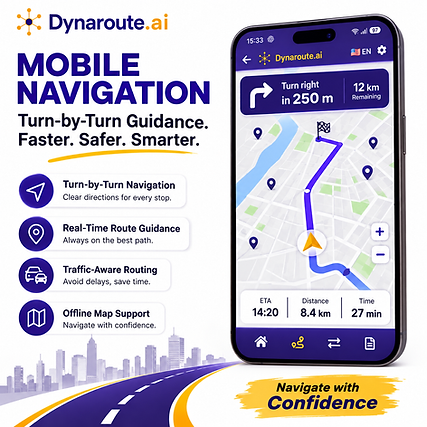
Mobile Navigation - From Optimized Route to Real-World Execution
Once Dynaroute.ai has created an optimized route, the route can be transformed into a navigable operational sequence.
From Optimization to Navigation
A typical DynaRoute workflow can be:
Import Stops → Geocode Addresses → Optimize Route → Review Route → Start Navigation → Visit Stops → Record Results
Instead of optimizing a route and then manually rebuilding it in another navigation application, DynaRoute keeps the route structure available directly on the driver's mobile device.
Stop-by-Stop Navigation
Drivers can work through the route systematically:
Current Location → Next Stop → Complete Visit → Continue to Next Stop
This is particularly valuable in routes containing many destinations, where manually searching for each address can create significant delays over the course of a working day.
Navigation + Operational Information
Mobile navigation becomes more useful when combined with operational stop information. Before or during a visit, the driver can identify details associated with that stop, such as:
Customer → Address → Order/Task → Stop Sequence → Navigation → Visit Result
This gives the driver more than a simple destination pin—it provides context for the work that needs to be completed at that location.
One Continuous Operational Workflow
One of DynaRoute's key advantages is bringing multiple stages of the field operation together:
Excel / OCR Import → AI Address Geocoding → Route Optimization → Mobile Navigation → Proof of Delivery
This creates a continuous workflow from raw order data to completed field activity.
DynaRoute Mobile Navigation turns optimized routes into actionable, stop-by-stop field execution—helping drivers reach the right place, in the right sequence, with the information they need.
Multiple Travel Modes

DynaRoute Multiple Travel Modes allows route planning to reflect the real type of vehicle or mobility method used in the operation. A route that is suitable for a passenger car may not be appropriate for a truck, motorcycle, bicycle or pedestrian field worker. Different travel modes can follow different road networks, restrictions, speeds and accessibility rules.
By selecting the appropriate travel mode before optimization, DynaRoute can produce routes that are more realistic for the actual field operation.
Why Multiple Travel Modes Matter
Using the correct travel mode helps improve route quality because each mode may have different routing behavior.
For example:
-
Car – suitable for standard urban and intercity operations
-
Truck – designed for commercial vehicle routing where road suitability and vehicle restrictions are important
-
Motorcycle – useful for fast urban delivery and courier operations
-
Bicycle – suitable for bike-based delivery and field operations
-
Walking / Pedestrian – useful for dense city centers, campuses, facilities and short-distance service operations
Instead of applying the same road logic to every operation, DynaRoute can adapt route calculations to the selected mobility profile.
More Realistic Route Planning
Multiple Travel Modes can help organizations:
-
Calculate routes appropriate for the selected vehicle type
-
Avoid unrealistic routing assumptions
-
Improve estimated travel distance and duration
-
Support different fleets within the same organization
-
Plan urban operations more effectively
-
Match routing strategy to operational conditions
-
Improve driver and field-worker productivity
-
Create more accurate route plans for specialized delivery scenarios
DynaRoute Multiple Travel Modes helps create more practical, realistic and operation-specific routes by optimizing according to the way each driver, vehicle or field worker travels.
Truck Route Optimization
DynaRoute Truck Route Optimization is designed for trucks and larger commercial vehicles that cannot always follow the same roads as passenger cars.
With Truck Mode, available in the Pro Plan, DynaRoute generates routes that are more appropriate for truck operations rather than simply applying standard car routing to a larger vehicle.
At the routing-engine level, truck mode uses truck-specific road restrictions when calculating distance, travel time and the route itself. This is important because a route that appears optimal for a car may not be suitable for a truck. The underlying routing technology supports truck-aware routing and can account for vehicle-specific routing constraints.
Truck Route Optimization can also work together with DynaRoute’s broader operational capabilities. Route planning can consider traffic conditions, distance, time, stop sequence, delivery priorities and operational costs, while vehicle capacity can be included in delivery and pickup planning.
For load-intensive operations, Truck Mode becomes even more valuable when combined with 3D Load Planning. DynaRoute can consider vehicle space, volume, weight and load arrangement, helping the user manage not only which roads to drive, but also what the vehicle is carrying throughout the route.
This makes Truck Route Optimization particularly suitable for wholesale distribution, food and beverage delivery, furniture and appliance delivery, construction supplies, industrial distribution, retail replenishment, large-parcel operations and other commercial delivery businesses using trucks.
The main idea is simple: a truck should not be routed like a car. DynaRoute combines truck-aware routing with multi-stop optimization and operational planning to create a route that is more realistic for the actual vehicle being used.
Built for Bigger Vehicles. Optimized for Smarter Operations

Vehicle Capacity Planning

An optimized route should not ignore whether the planned operation is physically possible.
Dynaroute.ai includes vehicle capacity planning so that the amount carried, delivered, or collected during the route can be considered as part of the operation.
This is particularly relevant for distribution, pickup, delivery, and mixed logistics operations.
A route may look efficient geographically but still be operationally inefficient if the vehicle is overloaded or incorrectly planned.
Capacity-aware planning helps connect route optimization with real vehicle operations.
3D Load Planning
DynaRoute 3D Load Planning goes beyond traditional route optimization by considering how cargo uses the physical space inside a single vehicle. Instead of looking only at stop order, distance or total weight, 3D Load Planning considers volume, vehicle capacity and load arrangement, helping make both routing and loading operations more organized.
The vehicle can be defined using operational loading parameters such as compartment height, width and depth, maximum cargo volume, maximum weight and maximum item count.
The 3D setup can also include cargo-alignment rules and whether item rotation is allowed. This provides DynaRoute with a much more realistic representation of the available loading space than a simple kilogram-based capacity limit.
At stop level, delivery and pickup items can contain information such as item name, quantity, height, width, depth, weight and alignment. This means DynaRoute can follow how the vehicle load changes throughout the route as products are delivered and new items are collected. The internal 3D workflow tracks arrival and departure load in volume, weight and number of items, so mixed delivery-and-pickup operations can be evaluated dynamically.
This is especially valuable for operations carrying furniture, appliances, large parcels, beverage cases, equipment, spare parts, medical supplies or other space-sensitive cargo. Two vehicles may be within their weight limit but still have completely different space-utilization problems; 3D Load Planning helps expose that difference before it becomes an operational issue.
DynaRoute also carries the loading information into its reporting layer. Reports can show 3D Load Usage, Peak Onboard Load, and how the load changes at individual stops—for example, how many items were onboard before and after a delivery or pickup and how full the vehicle became.
Optimize the Route. Optimize the Load. Use Every Cubic Meter Smarter.

Delivery and Pickup Route Optimization

DynaRoute allows deliveries and pickups to be planned together within the same optimized route.
Instead of managing outbound deliveries and return collections as separate operations, each stop can be defined according to what needs to be delivered, picked up, or both, creating a clearer and more efficient route flow.
This is especially useful for operations where the vehicle’s load changes continuously throughout the day. A vehicle may leave with goods to deliver, unload products at several customers, collect returns, reusable packaging, documents or new items at other stops, and continue the route with a different onboard load.
DynaRoute’s capacity planning can take the vehicle’s carrying capacity together with delivery and pickup quantities into account, helping reduce overload risk and inefficient loading.
Typical use cases include parcel delivery with returns, beverage and water distribution with empty-container collection, grocery distribution, pharmacy deliveries, laundry pickup and delivery, medical sample collection, equipment replacement, spare-parts distribution, reverse logistics and field-service operations.
The main advantage is that the route is planned as a complete operational workflow, not simply as a list of addresses.
Deliveries, collections, vehicle capacity and stop sequence can work together, helping reduce unnecessary mileage, repeated visits and manual planning.
Deliver. Collect. Optimize — All in One Route.
Last-Minute Orders
DynaRoute allows new orders to be added even after the route has already been planned and the operation has started. When a last-minute customer request arrives, the new stop can be inserted into the existing workflow and the route can be recalculated according to the current route structure instead of forcing the driver to start planning from scratch.
This is especially valuable for businesses where orders continue to arrive during the day—such as food and grocery delivery, pharmacies, couriers, wholesalers, field service operations, water and beverage distribution, and urgent pickup services. The new stop can be evaluated together with the remaining stops so that the updated route remains practical and efficient.
Because DynaRoute also supports re-optimization and Dynamic ETA, route changes can be reflected in the remaining visit sequence and arrival-time estimates. This helps the driver react to new demand without losing control of the original operation.
The result is a more flexible daily operation: instead of rejecting an urgent order or manually guessing where to place it, the driver can add the stop and continue with an updated route.
New Order. New Stop. Smarter Route — Without Starting Over.

Route Re-Optimization Adapt the Route When the Day Changes

DynaRoute Route Re-Optimization allows an existing route to be recalculated when real-world conditions change after the original optimization has already been completed.
Delivery and field-service operations are rarely static. A customer may cancel, a new urgent order may arrive, a stop may take longer than expected, traffic conditions may change, or a driver may need to deviate from the original plan. Instead of continuing with an outdated route, DynaRoute can optimize the remaining operation again.
The objective is to answer a simple operational question:
“Given where we are now, what is the best way to complete the rest of the route?”
Why Route Re-Optimization Matters
A route that was optimal at 08:00 may no longer be optimal at 11:30.
Re-optimization helps organizations respond to situations such as:
-
Last-minute orders
-
Customer cancellations
-
Failed deliveries
-
Unexpected delays
-
Traffic changes
-
Longer-than-planned service times
-
Priority changes
-
New pickup requests
-
Driver schedule changes
-
Stops that need to be rescheduled
-
Unexpected operational disruptions
Rather than rebuilding the entire route manually, the remaining stops can be recalculated based on the latest situation.
How It Works
A typical workflow may look like:
Initial Route Optimization → Route Execution → Operational Change → Re-Optimization → Updated Stop Sequence → Updated ETA → Continue Route
Completed stops remain part of the route history, while the system focuses on finding a better plan for the remaining unvisited stops.
For example:
Original route:
A → B → C → D → E → F
After visiting A and B, an urgent new order X arrives.
DynaRoute can evaluate the remaining operation and generate a new sequence such as:
Current Position → D → X → C → F → E
The driver therefore does not need to follow a route that was optimized before the new order existed.
Re-Optimization for Last-Minute Orders
One of the most important applications is handling last-minute orders.
A new delivery or pickup can be added while the route is already in progress. Instead of simply placing the new stop at the end of the route, DynaRoute can determine where it fits most efficiently among the remaining stops.
New Order → Add Stop → Recalculate Remaining Route → Update Sequence → Continue
This can reduce unnecessary mileage and help maintain service commitments.
Re-Optimization + Dynamic ETA
Route Re-Optimization becomes even more powerful when combined with Dynamic ETA.
When the route changes, the expected arrival times for the remaining stops can also change.
For example:
Operational Change → Re-Optimization → New Route Sequence → Updated Travel Times → New ETAs
This helps keep the route plan and the expected arrival schedule synchronized.
Failed Deliveries and Rescheduling
Re-optimization can also support situations where a stop cannot be completed.
A delivery may be marked as:
Successful | Failed | Reschedule
If a customer is unavailable or the stop cannot be completed, the remaining route can continue without requiring the driver to manually reorganize the entire sequence.
A failed stop may also be moved to a later position or planned for another visit according to the operational workflow.
Maintain Operational Constraints
Re-optimization should not mean simply finding the shortest path. The recalculated route can still respect the operational rules used during planning, such as:
-
Stop priorities
-
Delivery and pickup requirements
-
Vehicle capacity
-
Time windows
-
Service durations
-
Travel mode
-
Working-time constraints
-
Completed versus remaining stops
This makes re-optimization an extension of the original optimization logic rather than a completely separate route calculation.
Where Route Re-Optimization Is Most Valuable
It is especially useful in operations where conditions change frequently:
Courier & Parcel Delivery – new orders, cancellations and failed deliveries.
Food & Beverage Distribution – urgent customer orders or schedule changes.
Field Service – emergency jobs inserted into an existing technician schedule.
Healthcare & Home Care – appointment changes or urgent visits.
Pickup & Delivery Operations – new pickups appearing during the day.
Maintenance & Repair – emergency service requests taking priority over planned jobs.
Wholesale Distribution – urgent deliveries added after vehicles have already departed.
From Static Planning to Dynamic Operations
Traditional route optimization answers:
“What is the best route before the driver starts?”
Route Re-Optimization goes one step further:
“What is the best route now, given everything that has happened?”
This creates a much more resilient operational workflow:
Excel / OCR Import → AI Geocoding → Route Optimization → Mobile Execution → Dynamic ETA → Operational Change → Route Re-Optimization → Updated ETA → Proof of Delivery
DynaRoute Route Re-Optimization keeps routes relevant throughout the working day—allowing operations to respond intelligently to new orders, delays, cancellations and unexpected events without losing the benefits of optimization.
Priority-Based Route Optimization
Not every stop has equal business importance.
A high-value customer may be more important than a low-priority stop.
An urgent service request may need to be handled earlier.
A time-sensitive delivery may require special treatment.
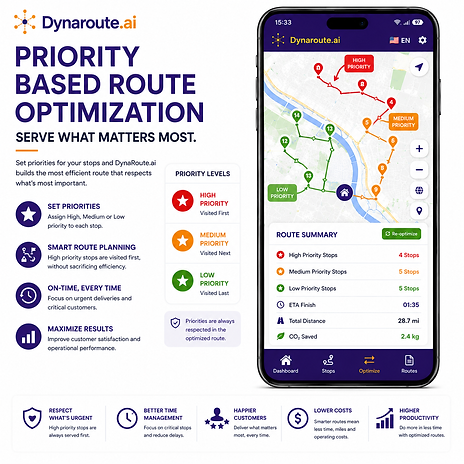
Dynaroute.ai supports priority-based routing, allowing operational importance to influence route planning.
This moves route optimization away from purely geometric optimization and closer to actual business decision-making.
Segmentation based Routing - Visit the Right Customers First

DynaRoute Segmentation-Based Routing lets you build business rules directly into the visit sequence. Instead of creating a route based only on the shortest distance or fastest travel time, customers can be assigned to segments and those segments can be given a defined visit order.
DynaRoute supports segmentation labels as part of imported stop data, and the system maintains configurable segmentation rules with an explicit ordering structure.
A typical example is grocery or retail distribution. Customers may be classified according to revenue, sales potential or strategic importance:
A → B → C → D
An A-segment store may represent the highest-value customers and therefore be visited before B customers. B customers are served before C, and C before D. DynaRoute can therefore optimize the driving sequence while respecting the commercial hierarchy defined by the business.
The segmentation rules themselves have configurable codes, labels and order values.
Segmentation does not have to mean only customer value. DynaRoute can also use segmentation to organize stops according to customer type, geographic region, operation type or other operational groups, making routes easier to align with real business strategies.
For example, segments could represent A = Key Accounts, B = Growth Customers, C = Standard Customers, D = Low-Priority Customers. They could just as easily represent wholesalers vs. retailers, premium vs. standard service, different sales channels, geographic territories, or visit-frequency categories.
The important distinction from ordinary route optimization is simple: the closest customer is not always the customer that should be visited first. Segmentation-Based Routing allows DynaRoute to combine geographic efficiency with business importance.
Segment Your Customers. Define the Order. Optimize Around Your Business.
Profit-Aware Routing
Route Optimization Should Consider Profitability, Not Only Distance.
One of the most important concepts within Dynaroute.ai is Profit-Aware Routing.
Traditional route optimization typically focuses on minimizing distance or travel time.
These metrics are important, but a business ultimately operates to create economic value.
Two stops that are geographically similar may have completely different business values.
One customer may represent significantly more revenue.
Another stop may require substantial travel or service time while producing limited economic return.
A slightly longer route may sometimes create greater commercial value than the mathematically shortest route.
Dynaroute.ai therefore introduces profitability into the route-planning discussion.
Profit-Aware Routing can consider expected revenue, operational costs, route efficiency, and stop priorities when supporting route decisions.
This changes the key question from:
“Which route is shortest?”
to:
“Which route creates the best balance between operational efficiency and business value?”

Cost Settings - Turn Route Distance into Real Operating Cost

DynaRoute Cost Settings allow users to define the real economic parameters behind their daily operation.
Instead of evaluating a route only by kilometers or minutes, DynaRoute can use your own cost assumptions to understand what that route actually means in money.
The application lets users configure distance units, currency, energy type, fuel consumption, fuel price and hourly operating cost. Energy profiles include gasoline, diesel, electric and hybrid options, with support for different consumption and fuel-price units.
These settings create a consistent financial foundation for route analysis.
For example, the same optimized distance can have very different business impacts depending on whether the vehicle consumes 6 L/100 km or 15 L/100 km, whether fuel is inexpensive or costly, and how much driver and operating time costs per hour. By saving these values once, DynaRoute can reuse them when evaluating route economics and savings.
Cost Settings are also directly connected to the ROI Calculator. The ROI Calculator uses the saved cost configuration together with the latest completed optimization to compare the operation before and with DynaRoute, including changes in route distance, route time and resulting daily savings.
This cost foundation is especially important for profit-aware routing, where distance and time are no longer viewed as abstract numbers. Route and stop performance can be evaluated in financial terms, helping users understand which operations create value and where unnecessary mileage or operating time is reducing profitability.
ROI Calculator for Route Optimization
How Much Money Can Route Optimization Save?
Dynaroute.ai includes an integrated ROI Calculator designed to measure the economic effect of route optimization.Most route optimization software tells the user how many kilometers or minutes were saved.
Dynaroute.ai goes further by helping translate those operational improvements into financial information.
The ROI Calculator compares the user's operational baseline with a completed optimized route.
The baseline can represent the route distance and route duration before Dynaroute, together with the number of working days and configured cost assumptions.
The optimized route provides the actual optimized distance and route duration.
The Dynaroute.ai ROI Calculator can provide a financial view of route optimization through indicators such as daily operational savings, distance saved per day, time saved per day, fuel or energy saved, monthly operational savings, subscription cost, monthly net benefit, annual net benefit, estimated payback period, and Return on Investment.This allows users to move from an operational statement such as:
“My optimized route is 14 kilometers shorter.”
to a business statement such as:
“What is that reduction actually worth to my operation every month?”
That distinction is fundamental.
Route optimization becomes measurable as a business investment rather than simply a mapping feature.
Dynaroute.ai can then evaluate the difference and present the economic impact of optimization.

Payback Period - Know How Fast DynaRoute Pays for Itself

DynaRoute’s Payback Period shows how many working days it takes for the operational savings generated by route optimization to cover the cost of the DynaRoute subscription. Instead of presenting route optimization only as kilometers or minutes saved, it translates those improvements into a clear financial result.
The calculation uses the user’s saved Cost Settings together with results from a completed optimized route.
DynaRoute compares the operation before and after optimization, calculates daily savings from reduced distance, fuel/energy consumption and operating time, and then compares those savings with the actual subscription cost.
In simple terms:
Payback Period = DynaRoute Subscription Cost ÷ Daily Operational Savings
For example, an actual DynaRoute result shows daily savings of USD 5, a Pro subscription cost of TRY 44.99, and a calculated payback period of approximately 9 working days.
The same financial summary also provides monthly net benefit, annual net benefit and ROI, giving users a broader picture of the economic impact of optimization.
If sufficient savings data is not yet available, the application can show the payback period as unavailable rather than presenting an unsupported result.
See the Savings. Measure the Return. Know When DynaRoute Pays for Itself.
Reverse Logistics
DynaRoute brings deliveries, pickups, returns and collections into a smarter single-vehicle routing workflow.
Reverse logistics is designed for operations where the vehicle not only delivers products but also needs to collect returned goods, reusable packaging, empty containers, damaged products or recyclable materials. DynaRoute includes both delivery/pickup workflows and Reverse Routes as part of its route-planning capabilities.
Instead of treating the return journey as wasted mileage, Reverse Routes help turn the vehicle’s return movement into productive work.
Delivery stops and pickup/return requirements can be planned around the same operating day, helping reduce unnecessary distance, fuel consumption and travel time while making better use of the vehicle.
This is particularly valuable for retail distribution, grocery and beverage delivery, e-commerce returns, reusable packaging, recycling, medical logistics and wholesale distribution.
The result is a more efficient circular operation: Deliver → Collect → Return → Reuse, with fewer empty kilometers and better control over daily logistics.
Deliver Forward. Collect on the Way Back. Optimize Every Mile.

Route Preferences and Avoidance Options

DynaRoute gives users more control over how an optimized route should actually operate in the real world. Instead of automatically accepting a single fastest route, users can shape routing according to operational and cost requirements.
DynaRoute supports avoidance preferences such as highways, toll roads and ferries, allowing the resulting route to better reflect the way the business wants to operate.
This is particularly useful when the theoretically fastest route is not necessarily the best operational route.
A driver may want to avoid expensive toll roads, keep away from highways for a particular type of operation, or avoid ferry crossings that could introduce additional cost or uncertainty. Combined with DynaRoute’s traffic-aware optimization, vehicle modes and route planning capabilities, these preferences help create routes that are more practical for daily field operations.
Curb Approach
DynaRoute’s Curb Approach feature helps the driver reach a stop from the correct direction and the appropriate side of the road.
Instead of treating a stop as only a geographic point, the route can take the required approach into account, making delivery and pickup operations safer and more practical.
Internal route data confirms that stops can be explicitly sent to the optimizer with a curb approach requirement.
Curb Approach is especially valuable for locations where approaching from the wrong side of the street could require a U-turn, an unnecessary detour, crossing traffic, or carrying goods across the road. By guiding the vehicle toward the correct curb, DynaRoute can help reduce unnecessary maneuvers and make each stop easier to serve.
For instant visibility in the field, curbside stops are identified directly on the map with a small “C” marker attached to the stop symbol. Drivers can therefore recognize special curb-approach stops immediately while following the optimized route.
This is particularly useful for parcel delivery, grocery distribution, food delivery, healthcare services, passenger pickup, schools, busy urban streets and locations with difficult roadside access.
Approach from the Right Side. Stop Smarter. Deliver Easier.

Proof of Delivery - Every Stop Verified

DynaRoute Proof of Delivery (POD) turns every customer visit into a traceable operational record. At the end of a stop, the driver can mark the visit as Successful, Failed, or Rescheduled. These statuses are clearly distinguished with different colors both on the map and in the stop-visit list, making it easy to understand the status of the entire route at a glance.
For a Successful POD, the driver can optionally capture a delivery photo, recipient signature, and notes, providing stronger evidence that the service was completed.
DynaRoute stores POD information together with the stop and route record, and route reports can identify whether full proof—such as photo and signature—is available.
When a delivery fails, the driver records the reason instead of simply marking the stop incomplete. Reasons can include situations such as customer unavailable, address not found, access problem, refused by customer, or another exception. For a Rescheduled visit, a new date and time can be assigned so the stop can be handled later.
The DynaRoute backend explicitly supports completed, failed and rescheduled POD states, requires a failure reason for failed visits and a reschedule time for rescheduled visits.
DynaRoute also adds an important location-validation layer to POD. The driver's location at the moment the POD is recorded can be compared with the customer's expected location.
If the completion occurs outside the permitted area, the system can flag the POD for attention and include the exception in operational reporting and audit information. DynaRoute reports already identify cases where POD was completed outside the customer location and can show the measured distance as a compliance risk.
Successful. Failed. Rescheduled. Verified.
DynaRoute helps turn every stop into visible, measurable and accountable field activity.
Report - KPI and Operational Performance
DynaRoute turns every completed route into measurable operational intelligence.
Daily reports bring essential route information and performance indicators together in one clear view, helping users understand not only where the vehicle traveled, but how effectively the operation was executed.
The mobile report includes route date, timezone, vehicle and departure information together with KPIs such as Success Rate, Failure Rate, Top Failure Reason, Average Delay, Sequence Adherence and Average Service Time.
By tracking these indicators, users can quickly identify recurring delivery problems, excessive delays, service-time issues and deviations from the optimized stop sequence.
DynaRoute’s reporting capabilities are designed to measure elements such as completed routes and stops, time usage, delays, delivery performance, operational cost and overall efficiency—turning daily route activity into information that can support continuous operational improvement.
Reports are also designed to be practical outside the app. The Daily Report can be exported to Excel, while the PDF / Send option opens the device sharing workflow so reports can be distributed through channels such as WhatsApp or email.
Measure Performance. Identify Problems. Improve Every Route.
